

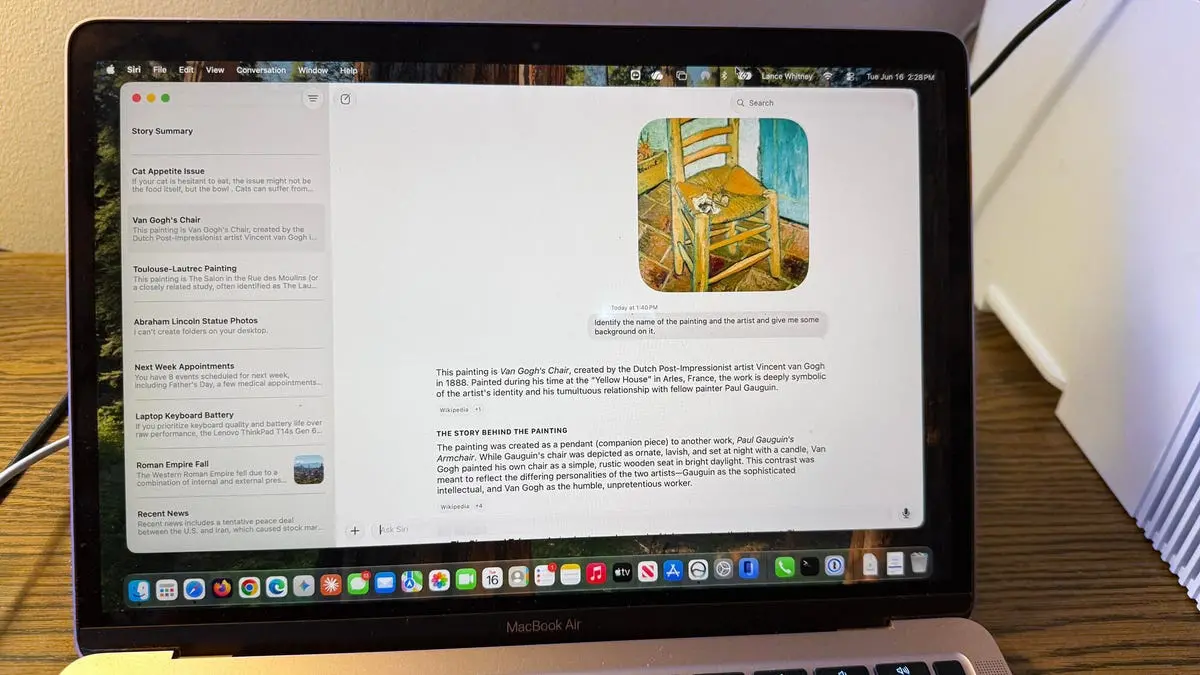
As an iPhone and Mac user, I've often complained about the many faults and flaws of Siri. That's why I've been anxious to check out the new Siri AI that Apple touted at WWDC 2026 earlier this month. The event showcased a revamped digital assistant that promises to be more conversational, more responsive, and less error-prone. Now, with the release of the MacOS 27 developer beta, I finally had the chance to put it through its paces.
The new Siri AI is part of Apple's broader push into generative AI, a space dominated by ChatGPT, Gemini, and other chatbots. Apple has always taken a more cautious approach to AI, emphasizing on-device processing and privacy. But with the introduction of Apple Intelligence – the company's suite of AI features – Siri is getting a major upgrade. The assistant can now access information on your device, understand context, and follow natural language commands better than ever before.
How to access the new Siri on Mac
To try the new Siri, you need to surmount a few barriers. First, your iPhone, iPad, or Mac not only needs to support version 27 of its respective OS but also must support Apple Intelligence. Supported devices include the iPhone 15 Pro, Macs with M1 or later chips, and iPads with the A12Z Bionic or newer. Second, you need to install the developer beta. Since these types of betas can be unstable, I strongly advise installing it on a spare device, not your main or go-to one. I have a spare iPhone 15 Pro and a spare MacBook Air M1 that I use for this kind of testing.
Third, you'll have to join a waitlist. For that, go to Settings (System Settings on a Mac), select the setting for Siri, and then tap the button for Turn Siri On. A message will tell you that you'll be notified when the new Siri is available for your device. And then be prepared to wait. I joined the waitlist on my iPhone last week and am still waiting. On my Mac, though, I was able to get access without waiting too long. And that's where I've been trying out Siri AI to see how it performs.
If your Mac meets all the criteria, you can access Siri AI a few different ways, including the new dedicated Siri AI app. If voice activation is enabled, just say "Hey Siri" or "Siri" and start speaking your request. Alternatively, click the Siri AI app icon on the Dock. The Siri AI app then pops up, letting you type or speak your request. Press the Command key twice, and a small text window appears in which you can type your question to Siri. Press the Command key and the spacebar to launch the familiar Spotlight search window, only now you can search by asking Siri to find something. Right-click on a window or other item, and the pop-up menu includes an option to Ask Siri.
The tests: How Siri AI compared to ChatGPT and Gemini
To evaluate the new Siri, I used the same set of tests I typically run on ChatGPT and Gemini. These cover a range of capabilities: general knowledge, file retrieval, photo identification, device control, conversational ability, and advice-giving. I wanted to see if Siri could avoid the pitfalls of the old Siri – its frequent misunderstanding of queries, lack of context, and inability to perform complex tasks. Keep in mind that this is an early flavor of Siri AI courtesy of the first developer beta, so there are bound to be bugs in it. But Apple still has several months to fine-tune it in time for its expected public release in September.
1. What's new?
First up, the new Siri does work like ChatGPT, Gemini, and other chatbots in many ways. But in contrast, it's less chatty and more direct. Here I started off by asking Siri what's new. Instead of engaging in personal chit-chat, it gave me a rundown of the latest news stories. Clearly, Apple is treating Siri AI more as an intelligent assistant and less like a chat buddy. This is a deliberate design choice – Apple wants Siri to be helpful without being intrusive or overly social. For users who just want quick answers, this approach works well. However, for those who enjoy the more conversational style of ChatGPT, it may feel a bit blunt.
2. Why did the Roman Empire fall?
Next, I gave Siri a general question: Why did the Roman Empire fall? Here, it provided a short explanation that it read to me, followed by a series of bullet-point causes. The response was short, about the same length as I'd get with another AI. Siri also cited the sources it consulted, with links I could open to check them. This is a welcome improvement – old Siri rarely provided sources. But the answer lacked the depth of ChatGPT's multi-paragraph analysis or Gemini's ability to offer multiple perspectives. For a quick overview, it's fine, but for serious research, it's still behind.
Also: Apple's new Siri AI comes with hidden costs that power users should know of
3. What laptop should I buy?
Here, I told Siri that I had $2,000 to spend on a laptop and that I value keyboard quality and battery life more than performance. I asked what I should buy. In response, Siri linked me to a few articles and social media posts about laptops but didn't give me its own opinion or even summarize the information it found. I then asked it to summarize the info and give me its own opinion, which it did. Disappointing at first, but my follow-up question coaxed Siri to serve up a better response. This highlights a key limitation: Siri AI doesn't always proactively synthesize information. You have to explicitly ask for a summary or opinion. ChatGPT and Gemini typically provide that upfront.
4. Show me my appointments
With Siri's ability to find information on your device, I next asked it to show me my appointments for next week. For this, it consulted my calendar and correctly displayed all my scheduled appointments. This is a fundamental task that old Siri could do, but the new Siri does it faster and with a cleaner interface. The response appeared in a drop-down window with clickable options to edit or add events. This integration with Apple's Calendar app is seamless and works well.
Also: 12+ iPhone settings you can change to noticeably improve its battery life (iOS 26 and older)
5. Find certain photos
Next up, I wanted to see if the new Siri could locate specific information. I asked it to find all photos of the statue of Abraham Lincoln in my Photos library. Here, Siri found only three photos, while my library actually contained six photos that matched. I'm not sure what criteria it used to find them or why it missed three of them. I also asked it to find several other photos based on specific details. The problem was the same. It found some but not all. This inconsistency is frustrating. ChatGPT can't access your photo library at all, so it's not a fair comparison. But Gemini on Android does a better job of locating media when given clear descriptions. Apple needs to improve the precision of its on-device search.
6. Control features and settings on my Mac
As the next step, I wanted to see if Siri AI could control certain features on my Mac. I asked it to turn on Do Not Disturb mode, which it quickly did. I then asked it to turn off Do Not Disturb, and it again complied. This is a basic system control that old Siri could handle, but the new Siri does it with fewer errors. I also tried more complex commands, like "Set the brightness to 75%" and "Open Safari and search for weather in Tokyo." Siri executed both successfully. This area shows the most promise – Siri AI excels at controlling the device itself, something ChatGPT and Gemini can't do natively.
Also: I've been testing iOS 27, and these 5 overlooked features make even older iPhones better
7. Analyze a file
Like most AIs, Siri is able to analyze files that you upload. For this test, I uploaded a photo of a painting by Toulouse-Lautrec and asked it to identify the name and artist and give me some background on it. But here, Siri dropped the ball. It provided the wrong name both for the painting and the artist. I tried again with a different painting. This time, Siri got the correct artist but misidentified the name of the painting. I tried one more time with a different painting, a popular one by Van Gogh. Siri finally got it right. The inconsistency is worrying. ChatGPT and Gemini identify artworks with high accuracy, especially well-known pieces. Siri's vision model seems less robust. This may be due to the smaller dataset Apple uses for on-device processing, or perhaps the beta hasn't fully integrated the image analysis capabilities.
8. Provide advice
Next, I told Siri that my cat Mr. Giggles sometimes won't eat his usual food and I'm not sure what else to try. I asked it to offer suggestions, to which it provided some clear and helpful advice. Siri also asked me whether my cat typically eats wet or dry food. After I responded to that question, Siri provided more information. The info provided was solid, but this type of conversation mode was awkward to use. Instead of Siri keeping the communication open, the AI seemed to stop listening after each response. I had to click the microphone icon each time I wanted to speak. Overall, the chat lacked the back-and-forth fluidity that I've experienced with other AIs. ChatGPT and Gemini maintain a continuous thread without requiring manual re-engagement. Apple needs to work on making the conversation flow more naturally.
Also: I never use a new iPhone until I change these settings - why they're such a big deal
9. Analyze what's on the screen
I next wanted to see how Siri would deal with content on the screen. I right-clicked on one of my ZDNET stories, chose the Ask Siri option, and asked it to summarize the story on the screen. Here, the phrasing of my request was key. Initially, I asked it to summarize the story, which it didn't seem to understand. Then I asked it to summarize what it saw on the screen, but for that, it summarized only the text visible on the screen. By finally telling it to summarize the story on the screen, Siri AI was able to provide a concise but helpful summary of all the key points throughout the entire story. Clearly, how you phrase your request makes a difference. This is a common challenge with AI assistants – they need explicit instructions. But ChatGPT and Gemini are better at inferring intent from context. Siri's screen analysis is still too literal.
10. Review and manage past conversations
Finally, Siri AI works like other AI apps in that it keeps track of your conversations and syncs them across all your Apple devices. To test this, I right-clicked a previous chat, triggering a pop-up menu. From there, I could rename the conversation, pin it, open it in a new window, or delete it. I also tried resuming a past chat. Specifically, I told Siri that it was wrong when it gave me the name and artist for a Toulouse-Lautrec painting. The AI tried again to identify it but was still mistaken. I had to tell it that the painting was by Toulouse-Lautrec. Only then was it able to identify the name of the painting and provide background on it. The conversation history feature is useful, but the AI's inability to learn from prior corrections is a drawback. ChatGPT, by contrast, remembers mistakes you've pointed out and often adjusts its behavior in future interactions.
Also: Your iPhone's USB-C port is surprisingly versatile - 14 features beyond charging
Overall assessment
Overall, I certainly found the new Siri AI an improvement over the old Siri. But I was disappointed by the incorrect or inaccurate answers it gave me. Plus, the back-and-forth conversation was clumsier than it should have been. But again, this is just the initial version of Siri AI in the first developer beta. Clearly, Apple has much more work to do before Siri AI is ready for the public. And, despite the hiccups, I think it's off to a promising start. The core functionality – device control, app integration, and local data access – is solid. Where Siri lags is in general knowledge accuracy and conversational fluidity. Apple's focus on privacy and on-device processing limits the amount of data Siri can draw from, which may explain some of the errors. As the beta progresses and Apple refines its models, we can expect improvements. For now, Siri AI is a credible alternative to ChatGPT and Gemini for Mac users who value tight integration with their Apple ecosystem, but it's not yet a replacement for those who need deep, reliable answers.
Source: ZDNET News