

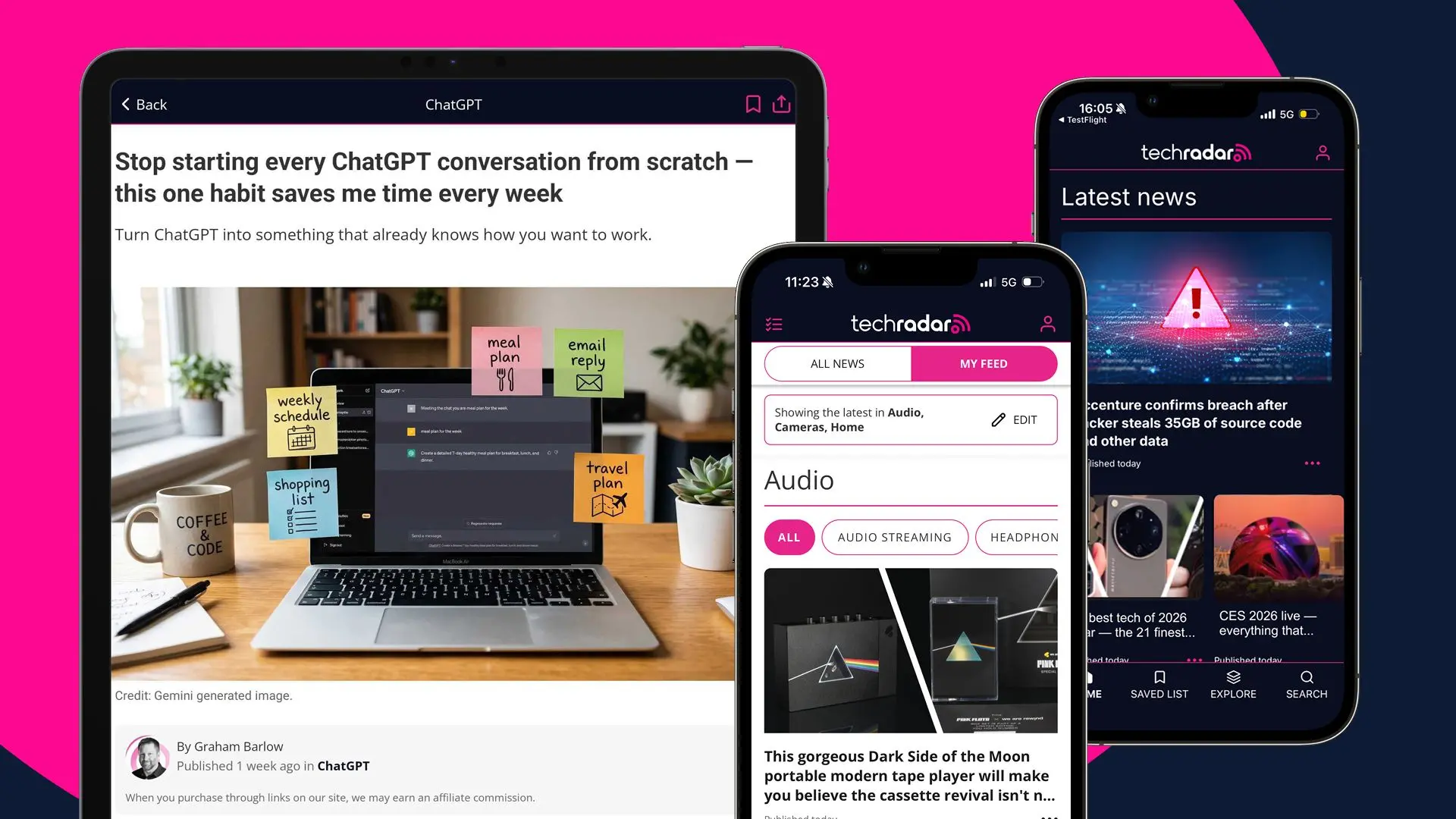
TechRadar, the well-known technology publication, has officially launched its own mobile app, giving readers a new way to access its extensive coverage of gadgets, reviews, and industry news. The app is now available for download on both iOS and Android devices, and it promises to deliver a tailored experience that puts the most relevant stories front and center.
The launch marks a significant step for the publication, which has built a reputation for in-depth reviews, buying advice, and breaking news. With the new app, readers can expect a faster, more personalized way to stay informed about the latest developments in technology.
What the TechRadar App Offers
The TechRadar app is designed to be a one-stop shop for tech enthusiasts. It brings together the publication's entire editorial output—from hands-on reviews of the latest smartphones and laptops to analysis of emerging trends like artificial intelligence and electric vehicles. The app's home screen features a dynamic feed that adapts to each user's interests over time.
Upon first opening the app, users are asked to select topics they care about, such as mobile, computing, gaming, audio, smart home, and security. The app then uses this information to curate a personalized stream of articles, reviews, and videos. The more you read, the better the recommendations become, thanks to a machine learning algorithm that tracks reading habits and engagement.
Personalized News Feed
The personalized feed is arguably the app's standout feature. Instead of a one-size-fits-all homepage, every reader gets a unique mix of content. For example, someone who frequently reads about Android phones will see more coverage of the latest Samsung or Google devices, while a Mac enthusiast will get more Apple-related news. The feed also includes a For You section that highlights stories based on past reading behavior.
Users can further fine-tune their experience by following specific topics, authors, or product categories. A dedicated Following tab lets you quickly access the latest from your favorite writers or the product lines you care about most. This level of customization is a first for TechRadar and reflects a broader trend in digital media toward personalized content delivery.
Offline Reading and Saved Articles
Another key feature of the TechRadar app is offline reading. Users can save articles to their device for later access, making it possible to catch up on reviews and news even without an internet connection. This is particularly useful for commuters, travelers, or anyone who wants to read during a flight or in areas with spotty coverage.
The saved articles section is accessible from the main navigation bar, and saved stories are automatically synced across devices if you create a free account. This means you can start reading an article on your phone and finish it on your tablet without missing a beat. The app also supports background downloading, so your saved articles are ready whenever you are.
Breaking News Alerts
For readers who want to stay on top of major tech events, the app offers customizable breaking news alerts. You can choose to receive notifications for urgent news, product launches, or specific topics like cybersecurity or space exploration. The alerts are designed to be timely but not overwhelming, with options to mute them during certain hours or disable them entirely.
The notification system is powered by TechRadar's editorial team, ensuring that only the most important stories trigger an alert. Whether it's a new iPhone announcement or a major security breach, you'll be among the first to know. The app also includes a dedicated Breaking News section that aggregates all urgent stories in one place.
Video and Multimedia Content
The TechRadar app isn't just about text. It also includes a rich multimedia experience, with video reviews, hands-on demos, and explainer videos embedded throughout the feed. The app supports full-screen playback and picture-in-picture mode, so you can watch a review while browsing other articles. There's also a dedicated video tab that curates the latest clips from TechRadar's YouTube channel and original productions.
In addition to video, the app features photo galleries and interactive comparisons. For example, a smartphone review might include a side-by-side photo comparison tool that lets you see how different cameras perform in various lighting conditions. These interactive elements are designed to make the reading experience more engaging and informative.
Dark Mode and Accessibility
The app ships with a system-wide dark mode that can be toggled manually or set to follow your device's appearance settings. This reduces eye strain in low-light environments and can save battery life on OLED screens. The app also includes a range of accessibility features, such as adjustable font sizes, high-contrast mode, and support for screen readers.
TechRadar's design team has paid close attention to readability, with clean typography and ample whitespace. Articles are formatted for mobile screens, with clear headings, bullet points, and images that load quickly even on slower connections. The app also includes a reading progress indicator, so you can see how much of a long-form article you have left.
How to Download the TechRadar App
The TechRadar app is available for free on the Apple App Store and Google Play Store. It requires iOS 14 or later and Android 8.0 or later. The app is currently available in the United States, United Kingdom, Canada, Australia, and several other English-speaking markets, with plans to expand to more regions in the coming months.
To get started, simply search for TechRadar in your device's app store, download the app, and create a free account. You can also sign in with your existing TechRadar account if you have one. The app will then guide you through the process of selecting your interests and setting up notifications.
Free vs. Premium
The app is free to download and use, supported by advertising. However, TechRadar is also offering an optional premium subscription that removes ads and unlocks additional features, such as exclusive newsletters, early access to certain articles, and a ad-free reading experience. The subscription is priced at $4.99 per month or $49.99 per year, with a one-month free trial for new users.
According to TechRadar, the premium tier is aimed at the most dedicated readers who want a cleaner, more focused experience. The publication has emphasized that the free version will remain fully functional and will not be crippled in any way. All articles, reviews, and videos will be available to all users, regardless of subscription status.
What This Means for Readers and the Tech Media Landscape
The launch of the TechRadar app reflects a broader shift in how people consume technology news. As more readers turn to mobile devices for their daily information, publications are investing in dedicated apps to build direct relationships with their audiences. By offering a tailored experience, TechRadar hopes to increase engagement and loyalty among its readers.
The app also represents a new channel for the publication to distribute its content, bypass
Source: TechRadar News