

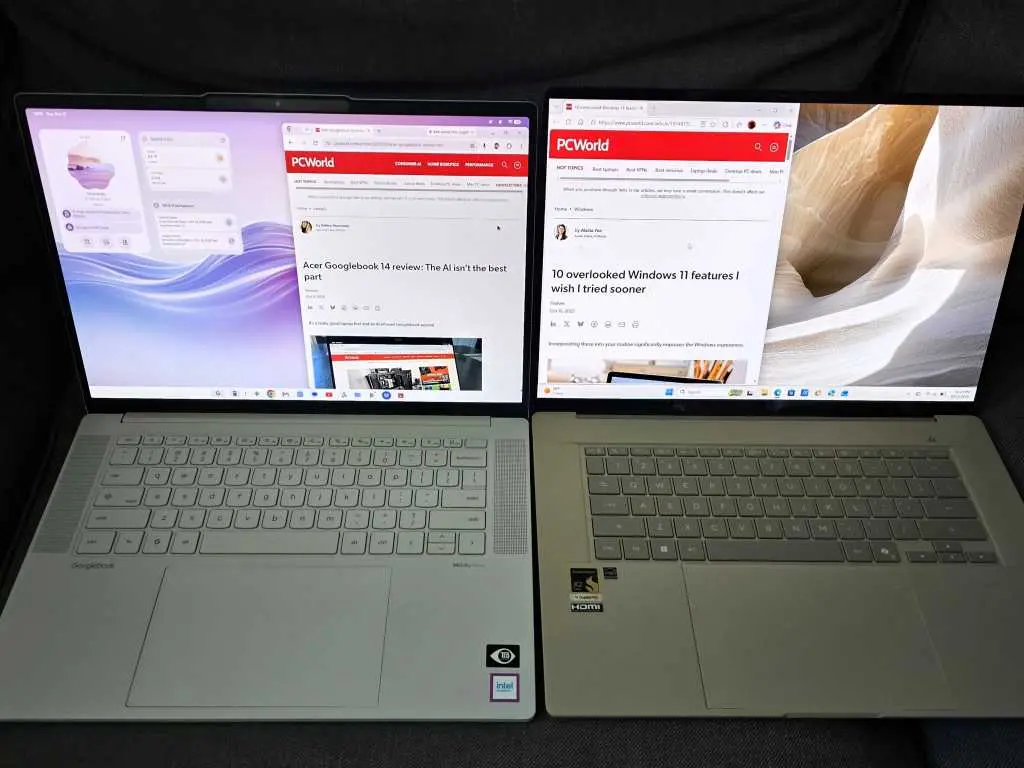
The Googlebook Arrives With AI as the Main Attraction
Googlebooks have arrived, and their pitch is straightforward: bring deeper, smarter productivity to the Google ecosystem. The first models, including the Acer Googlebook 14 and Lenovo Googlebook 15, run Aluminium OS, a platform that represents the next evolutionary step for Chromebook-style devices. Instead of treating AI as an add-on, the Googlebook makes AI-powered productivity the center of the experience. The hardware may vary, but the software story is consistent: widgets, voice dictation, screen awareness, and Gemini integration are meant to help users do more with fewer steps.
That ambition matters because the laptop market has been saturated with iterative updates. A new operating system and a new class of devices do not appear often. When they do, they invite comparisons with Windows 11, the default productivity platform for hundreds of millions of workers. The Googlebook does not simply ask whether ChromeOS or Android apps can run on a laptop. It asks whether Google can turn AI features into daily habits that make a laptop feel faster, more context-aware, and less dependent on manual input.
The early answer is mixed. Some features feel genuinely clever. Others feel incomplete, slow, or awkward. The result is a device that can impress in a demo but frustrate in a full workday.
The Phone Requirement Creates an Early Friction Point
One of the most important productivity questions for any modern laptop is how well it connects to a phone. For Googlebook, the answer is complicated by a hard requirement: the laptop wants an Android phone, and specifically an Android 17 phone. Google has only recently allowed rival Samsung phones to connect, but support is not universal. A Samsung Galaxy S23 can be fully updated and still run Android 16, which means it cannot join the Googlebook’s cross-device features. That leaves the phone and laptop living separate lives even when the hardware is modern.
Windows takes a more forgiving approach. Phone Link, once known as Your Phone, connects an Android phone to a Windows PC with an Android 10 requirement. It supports photo transfer, Bluetooth calling, messaging, and running Android phone apps inside PC windows. From early comparisons, Phone Link matches the Googlebook’s Better Together feature in most areas except app streaming. Windows can be fussy about which phones support that specific capability, while Googlebook promises broader support among compatible phones, provided they meet the Android 17 caveat.
That caveat is not minor. Cross-device productivity depends on trust and immediacy. If a user has to check an OS version before pairing, the feature has already lost part of its value. Windows does not solve every phone integration problem, but its lower barrier gives it an advantage for people who upgrade phones less often or use a mix of Android brands.
Android Apps on a Laptop: Outlook Shows the Cracks
The Googlebook’s reliance on Android apps is another double-edged sword. Windows users take for granted that Outlook is a full desktop application that can remain open, synced, and secured by the operating system. On the Googlebook, Outlook runs as an Android app. In practice, that meant a slow setup for a work account, repeated authentication requests after every logon, and at least one crash. The experience was not just inconvenient; it interrupted the basic rhythm of checking email and managing a calendar.
Windows, by contrast, secures the entire OS with Windows Hello or a password and then leaves Outlook available for immediate use. The Lenovo Googlebook does include face and fingerprint login options in front of an optional PIN, which is a welcome hardware touch. But security hardware cannot fully compensate for app behavior that makes a core productivity tool feel fragile.
This is the central tension of the Googlebook. Android apps give the platform access to a huge library, but they were not designed for every laptop workflow. Some apps adapt well. Others behave like phone software stretched across a larger screen, with authentication models, window management, and background behavior that do not match desktop expectations. For casual use, that may be tolerable. For work, it can be a daily tax.
Widgets, Magic Pointer, and Rambler: Where Googlebook Shines
Not every AI feature on the Googlebook disappoints. The desktop widget system is one of the strongest ideas. On Windows, widgets often feel like a distraction relegated to a closed corner window. On the Googlebook, widgets live directly on the desktop, where they can be created and modified to show the information a user actually wants. There are pre-designed options, including a screen-time widget, and users can build their own.
Gemini can also generate widgets from a prompt, which points to a more flexible future. The execution is not yet reliable. A request for an up-to-the-minute widget tracking the MLB playoffs produced only scores. A request for a widget highlighting priority email was blocked because direct email access is not built in. Still, the direction is promising. Microsoft has promised something similar with a Copilot Code feature, though it has not been tested as widely. Google’s approach may simply be easier to understand and use.
Screen recognition is another area where Google has an edge in simplicity. Magic Pointer and Copilot Vision both aim to highlight and explain what is on the screen. Magic Pointer launches when the user wiggles the mouse pointer, which is more memorable than another keyboard shortcut. It opens a context-aware Gemini session that knows what the pointer is aimed at and allows questions about it. Copilot Vision takes a different route, living inside Copilot and continuously watching what the user sees once activated.
Both have flaws. Copilot Vision struggled to identify what it could see. Magic Pointer took nearly a full minute to respond using its Flash-Lite engine, which is unacceptable for a feature meant to feel immediate. Speed will decide whether these tools become reflexes or novelties.
Rambler, Google’s voice dictation system, is a clearer win. Windows offers dictation across the platform and inside Word, but it can be literal and rigid. Rambler handles verbal fry, the ums, ers, and you-knows that pepper natural speech, and smooths them out. It also inserts punctuation and breaks sentences appropriately. The Caps Lock key can trigger Rambler and other utilities, repurposing a key that most people rarely use. That is a smart shortcut because it turns an ignored key into a productivity hub. In testing, Rambler dictated multiple paragraphs with punctuation and sentence breaks intact. That is AI done right: invisible when it works, useful when it is needed.
The Files app also showed a glimpse of AI-assisted search. The system promised to append AI-generated descriptions to files without renaming them, making them easier to find later. That behavior did not reappear consistently. Windows 11’s semantic search and recent Search changes look just as promising, if not more so, because they build on an existing file system and search infrastructure.
Familiarity, Performance, and the Windows Advantage
Windows is not elegant in every corner, but it offers many ways to complete the same task. That redundancy meets users halfway. On the Googlebook, some basic actions felt unnecessarily opaque. Finding how to reboot required discovering that the power button handled it. The Caps Lock shortcut worked in some scenarios, such as Gmail, but not in others. Right-clicking the desktop produced no response at all, which created a sense of uncertainty rather than simplicity.
Performance also matters. A Lenovo Windows laptop with Panther Lake silicon felt more responsive than the Googlebook. The Windows machine had a far superior keyboard, while the Googlebook’s keyboard was unexpectedly poor. Even with 16GB of memory, the Googlebook felt choppy and laggy when running a few apps and Chrome tabs alongside two displays. Battery life was difficult to judge because there was no great way to track it. A custom ROM might help, but that is not a mainstream solution.
The hardware was never expected to be the star, but it still shapes the verdict. A laptop is a physical tool. Keyboard feel, trackpad response, thermal behavior, and battery reporting are not side notes. They determine whether a device can be used for hours of focused work. The Googlebook’s software ideas are interesting, but the whole package does not yet feel as cohesive as a familiar Windows laptop.
The Wider AI PC Race Adds Pressure
The Googlebook is not arriving in a quiet market. It is landing alongside a wave of AI-focused laptops and platforms. The Nvidia RTX Spark platform is expected to power high-end machines that could cost up to $7,000. A Surface Laptop Ultra has been confirmed as part of the coming wave, with a keyboard that feels tighter than the Surface Laptop Studio, though its performance remains under evaluation. These systems are pushing AI workstation capabilities into notebooks, and their pricing shows how much ambition is being packed into the category.
Software is moving in the same direction. AI is being injected deeper into Windows, especially through Windows Search, which is becoming a more prominent control center. Meanwhile, open-source experiments such as the Artcraft apps are creating AI-generated clones of popular creative software, from Photoshop-style tools to Premiere-style video editors, coded in Rust. The developer then moved on to Microsoft 365-style apps. The appeal is obvious: no subscriptions. The risks are equally obvious: copyright questions, bugs, and uncertain long-term maintenance.
On the chip side, the AMD Ryzen AI Max+ PRO 495 is set to compete with the new Mediatek-Nvidia RTX Spark partnership for AI workstation notebooks. One configuration promises up to 192GB of unified memory. More memory allows larger AI models to run locally, which could change what users expect from a laptop. The contest between these platforms will shape the next phase of AI PCs, and it may ultimately matter more than any single widget or dictation feature.
Googlebook’s individual AI tricks are worth watching. Desktop widgets, Magic Pointer, and Rambler show that Google can design thoughtful productivity features. But the phone requirement, Android app friction, uneven performance, and inconsistent shortcuts keep the overall package from beating a Windows laptop for everyday work. The smartest features are not enough when the basics still feel harder than they should.
Source: PCWorld News